On this page
Find remembered information and resume a project
Use memory to inspect remembered material; use projects to organize ongoing work. Neither is a guarantee of perfect recall or completed action.
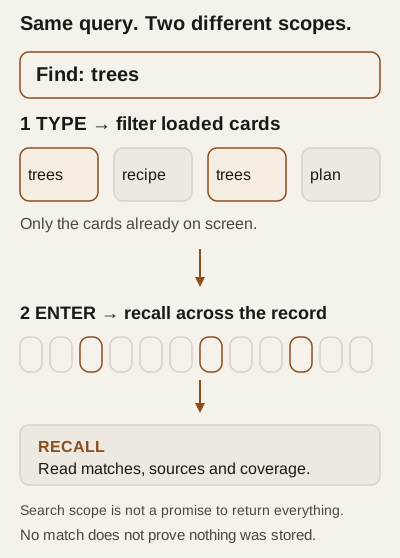
Concept diagram — a synthetic query showing the two search scopes, not a screenshot.
Before you start
Use non-sensitive examples. Search results, project names, descriptions, focus and files can reveal private information on screen. Project context can enter later model requests; with an external model endpoint, that information can leave your machine. Do not put credentials or confidential records into this exercise. See preparation.
Find something beyond the loaded memory cards
- In the memory view, type a distinctive word into Filter what is loaded · Enter recalls the whole record. Typing filters the loaded cards, not the entire history.
- Press Enter with a non-blank query to request recall across the record's searchable sources. The RECALL card displays the returned text. “Whole record” is a search scope, not a promise to display everything.
- Read source availability, match types and truncation warnings. No result is not proof that nothing was stored. Try another distinctive word before drawing that conclusion.
Recall can reinforce returned memories for later retrieval; it is not purely read-only. This does not edit the original history or create a new experience. See retrieval and reinforcement.
The MEANING LAYER card explains the selected embedding source and coverage. Its selector changes configuration: it is not just a display filter. Choosing the provider can send stored memory text and search cues to its embeddings endpoint, with possible charges. A plugin option computes vectors on this machine under host restrictions. nothing: the layer is off disables this layer, not ordinary word matching or other model traffic. Turning it off is not an erasure or provider-retention request. Coverage can lag during background processing; waiting or set-aside rows do not mean deletion.
Keep a small workroom
Synthetic example — not an observed interaction: organize a public reading list, without uploading personal files.
- In the project dock, choose new. Enter
Public reading listin Name, explain the task under WHAT IS IT?, then choose Create. Wait for the returned project state; Creating… alone is not confirmation. - Select its project bubble. Important: opening a bubble also requests that the open project become the identity's working project; it is not a read-only preview. Check working here.
- In Overview, set OUTCOME to “A short public reading list”; put “A list with three public titles is written” under ACCEPTANCE, and “Use public information only; no purchases” under CONSTRAINTS. Choose Save contract. Saving replaces the whole contract, not one field in isolation. Constraints describe the agreement; they are not a substitute for capability permissions.
- Write a useful next step under FOCUS and choose Save focus. Later selection brings this focus back into working context. Inspect Files and Work for directory entries and attributed sessions; lists can be capped.
- Ask the identity to help within that scope. A conversational request is not proof it created a file, recorded evidence or finished the task. Inspect the result and recorded state.
A lost connection or error can leave the outcome uncertain. Preserve your draft, reconnect and inspect current state before repeating a create/save. Do not treat a button press or the word “saved” in isolation as a receipt.
Pause, finish or hide — different choices
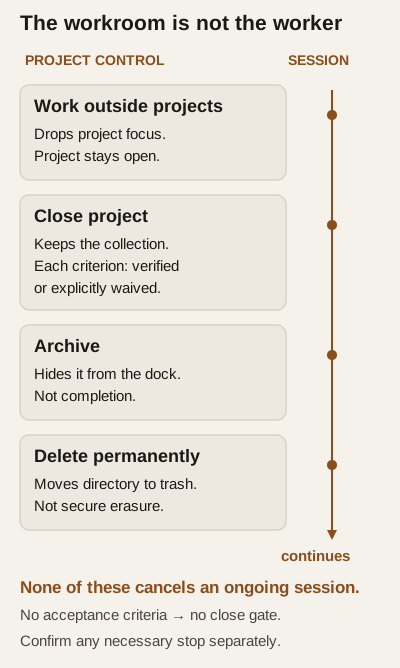
Diagram — the four project controls, and what each leaves untouched.
With no acceptance criteria, closing is allowed without the gate. The archived control reveals archived projects; Unarchive opens one again. No tested trash-restore procedure is supplied here.
None of these cancels an ongoing work session or undoes external actions. Confirm any necessary stop separately. The identity has separate operations for recalling, recording notes and managing project evidence; the memory view is not an equivalent general-purpose editor or eraser.
Why memory and projects behave differently