On this page
Dashboard map
Where things actually live
The fixed navigation is Home, Chat, Projects, Memory, Identity, Plugins, Settings. Chat is the default unless a saved view or recognized address selects another. An update shortcut appears when applicable. Work, Messages, Expert and Backups are not four extra top-level tabs.
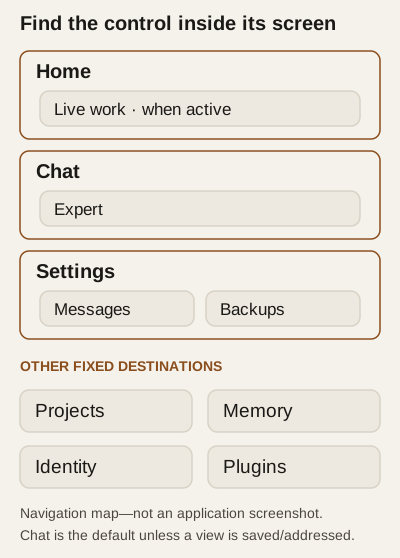
Diagram — seven fixed destinations, four nested views.
| Surface | Built-in address / location | What to expect |
|---|---|---|
| Home | #/home |
Greeting, brief, project cards, rings and recent experiences; continuity/build strip. The text field carries a draft into Chat; it does not send it. |
| Chat | #/chat |
Conversation, composer, receipts and conditional model/voice controls. See conversation controls. |
| Identity | #/identity |
Morning brief, charter and approval provenance, continuity, relationship trust/autonomy. See identity inspection. |
| Memory | #/memory |
Self-model, beliefs, intentions, recent experiences, meaning-layer coverage and recall. See memory and projects. |
| Work | Home's Live work — Ring 4, plus status panel/pill | Running, queued and recently delivered sessions; result text and operator grading when offered. No built-in #/work view. |
| Projects | #/projects, #/projects/<id> |
Shared workrooms and focus, not a substitute for live-session state. See project guide. |
| Messages | #/settings/messages |
Arrivals, sends, notices and Contacts. See communication. |
| Expert | Chat checkbox/panel | Off-dashboard notice routing control, not a separate developer console. |
| Plugins | #/plugins |
Catalog, installed/pending packages, settings and grants. See files, tools and voice. |
| Backups | #/settings/backups |
Backups & Keys, also linked from Identity. See backup and restore. |
| Settings | #/settings/<section> |
Operator configuration; section list below. |
A delivered work result is a recorded claim, not independent verification. Home offers Served, Partly, Not served grading for delivered work; Partly/Not served can include a comment. Connection loss requires checking the returned recorded state, not assuming a click committed.
Settings inventory
These are the shipped section labels and fragment suffixes; follow the linked topic for procedures rather than changing unfamiliar controls experimentally.
Section (suffix) |
Coverage / caution |
|---|---|
Substrate (substrate) |
Provider/model selection; applying a candidate can make a real inference request. |
Providers (providers) |
Provider entries, credentials, models and advanced options. Models/providers. |
Speech (speech) |
Input/reply engines, conversation mode, browser echo and who is heard. Voice. |
Dashboard (dashboard) |
Bind address, HTTPS, access token, Public name and theme. Network exposure and token rotation are security changes. Privacy. |
Backups & Keys (backups) |
Snapshots, verification, encryption/escrow and recovery controls. Recovery. |
Witness (witness) |
Witness URL/event interval; card says next boot. |
Prompt (prompt) |
Token/recent-turn limits; card says next boot. |
Agency (agency) |
Local routing preference for role-tagged workers; card describes live application and explicit-route precedence. |
Logs (logs) |
Logging configuration and file-tail viewer; configuration says next restart. Logs may contain sensitive diagnostics. |
Sandbox (sandbox) |
Operator-granted reach. Permissions. |
Tools (tools) |
Tool enable switches, not a list of guaranteed successful operations. |
Storage (storage) |
Database format/maintenance and SQLite-copy export. Compression is not encryption; export is private, unencrypted runtime data, not a full identity backup. |
Messages (messages) |
Read-only message inspection followed by mutable Contacts editor. Saving a missing contact can release already queued mail; review waiting sends first. |
Held mail (held-mail) |
Historical addressing repair. Correct and queue can cause external delivery; not routine retry/cancel/delete. |
Updates (updates) |
Update state/actions and conditional Mac uninstall offer. Updates/diagnostics. |
Configuration reference explains configuration boundaries. Unsaved fields are drafts; pending acknowledgement and restart requirements vary by control. Do not infer that every Save takes effect immediately.
Conditional and developer surfaces
Before birth, Chat shows setup/restore instead of ordinary identity content. Work appears only when there is live, queued or delivered work. Voice, model choices, update actions, token/private-connection actions, Public name status and uninstall depend on runtime capability/state. SAFE reports a frozen record and suspends mounted sections.
Custom UI sections may add tabs or occupy rail/panel/dock/overlay slots according to the active desktop/mobile layout. Developer sections are explicitly bannered UNVERIFIED — dev section served from disk; these are not additional standard navigation. Their bridge is a bounded integration surface, not a blanket stable public API. No built-in Evolution page or evidence-graph editor was found in this shell. Changes over time are inspected through stored material, not a claimed universal evolution dashboard.
Status areas show counts, substrate/build, work, continuity/witness information, credential warnings and conditional odd-call/UI-adapter notices. These are diagnostic observations, not proof that a task succeeded or a belief is true. Consult diagnostics; avoid publishing raw logs, tokens or private screenshots.