On this page
Set up and have a first conversation
Outcome: deliberately create an identity if needed, then ask for a small useful explanation and inspect the reply. The example below is synthetic. It is not a transcript, measured success or guarantee of the model's answer.
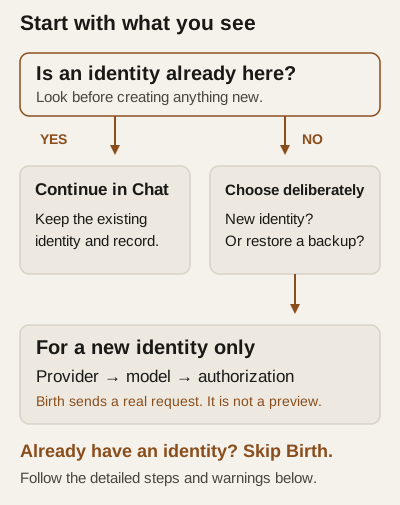
Decision guide — check existing state before taking an action.
Before any action
Install and open must have reached a connected dashboard. Read preparation: provider selection/discovery and initial platform setup can contact services before Birth. Model requests may disclose context and incur charges. Choose a provider, offered model and permitted budget; the documentation does not promise a host-enforced spending cap.
Use no private files, account details or identifying example data. For this task, do not enable plugins, grant extra folders or open a microphone. A text request is sufficient. Asking for text-only work is a task constraint, not an additional architectural security barrier.
Step 1: Establish whether an identity already exists
If you already see your identity and conversation, skip new-identity setup. If the page says No identity lives here yet., decide whether you want a new identity or to restore an existing one. Restoration has a separate entry, Restore an identity from a backup instead; follow the restore precautions.
Do not create a disposable identity merely for a screenshot, or use Birth as a retry for an identity that may already exist.
Step 2: For a deliberately new identity only
- Choose PROVIDER, then MODEL from those actually offered.
- Complete the authorization that provider requires. The setup source includes API KEY, conditional sign-in, and SERVER URL for local entries; availability varies. Put credentials in the authorization control, never in Chat.
- For a local server, confirm its actual URL. The source blocks Birth until the currently entered address has returned a model list. A successful list is not proof of an affordable or suitable inference result.
- Before clicking Birth, authorize sending the founding prompt to the selected endpoint and the possible cost. Birth sends a real request and can persist credentials, generate an identity key and write its signed founding record. It is not a preview.
- Click Birth once and wait for the result. The source displays Birthing…. Reconnection or an error requires inspecting identity state before another attempt; a later failure can follow successful identity creation.
Intended checkpoint: an identity exists and its founding reply is shown in Chat. A visible reply does not independently establish every recording or startup stage. If uncertain, use phase-specific triage rather than resetting state.
Step 3: Send one ordinary message
The first-use interface suggests introducing yourself and considering a name. Share only what you want retained and sent to the selected endpoint; a real name is not necessary for this demonstration.
Use the Chat message composer for a small task. Its placeholder is Message
Please draft a three-step plan for learning to identify common trees in a local park. Keep it text-only and use no tools or external lookups. Mark any uncertainty rather than inventing local facts.
This illustrative prompt is not a tested capability claim. An ordinary message can send identity context and earlier conversation as well as your text. Review the request flow before including sensitive information.
Choose Send deliberately. Enter also sends; Shift+Enter does not send. Do not type anything for a screenshot-only observation. A pending card means a delivery stage is in progress, not that recording succeeded.
Step 4: Inspect the result
A useful result here would be three actionable, non-location-specific learning steps with uncertainty respected. Exact wording varies. Check facts and proposed actions yourself; a fluent answer is not independent verification.
- If sending is unavailable, the connection fails or a pending card persists, consult the control reference and delivery triage.
- Do not repeatedly send the same request merely because no answer is visible. Acceptance, recording and answering are separate stages; replaying may duplicate a request.
- Dismiss removes the pending card; it is not cancellation. Do not use it to stop activity or infer that no request was recorded.
- A reply can remain visible after a recording error. Keep the warning with the observed text when reporting the problem; do not assume history was saved.
A single reply establishes neither perfect memory nor reliable future follow-through. For those distinctions, read continuity and context and ongoing work.
Finish deliberately
No further message is needed for this exercise. Closing the browser is not evidence that the background service, voice session or ongoing work stopped. This draft has not replayed shutdown on each platform; use operations guidance and verify actual status before an operational change. Make a backup and custody plan before relying on the record.
Acceptance remains open: clean replay of every step, actual screenshots, recording checkpoints, safe stop behaviour and an unfamiliar reader completing the route without coaching.
Implementation evidence
- internal/dashboard/static/index.html
- internal/dashboard/static/firstboot.js
- internal/app/ceremony.go
- internal/app/interaction_record.go