On this page
Backup and restore
Know what you are protecting
A snapshot captures the identity's ledger, whole database (including conversations and lived-time state), ledger segments and applicable witness material, with a receipt and checksums. The implementation proves the copied record and database in scratch before keeping it. This is a data recovery point, not a whole-computer image: it does not include configuration, provider credentials, private signing or decryption keys, plugins, model files or your working files. Arrange those separately.
Sources: Snapshot contents and proof
Restoring records cannot reproduce a model's behavior. The new-machine route separately asks for provider and model access; the snapshot neither packages the model nor reverses external actions already taken. A restored conversation is not an undo of a sent message or a remote file change.
Make recovery independent of this machine
In Settings → Backups & Keys, inspect the last pass, encryption state and snapshot date and record number. Back up now requests a snapshot; Prove it restores checks a retained one without replacing the live identity. These controls refuse SAFE or disabled-maintenance operation. A local snapshot is not an off-machine backup.
Sources: Backup controls; Scratch-only proof
Maintenance is enabled by default, runs daily at 04:00 local time while the application is running, and retains eight scheduled snapshots plus one separately retained on-demand snapshot: repeated manual backups do not build an unlimited archive. If disabled, the pass verifies nothing and copies nothing. SAFE walks the record but makes no snapshot.
Sources: Schedule and defaults; Retention
A dashboard escrow seals the signing key and snapshot-decryption key under your passphrase. Save that file, select it again and check it. Creation or download alone does not establish custody or enable encryption: a check must attest this identity and this host's snapshot key. Encryption applies to subsequent snapshots, not retroactively to plaintext ones. A missing or mismatched receipt leaves snapshots unencrypted.
Sources: Escrow controls; Escrow host coverage; Encryption gate
Keep the escrow file and its passphrase where machine loss cannot take them both; also retain the snapshot itself. Neither an escrow alone nor an encrypted snapshot without its decryption key restores the records.
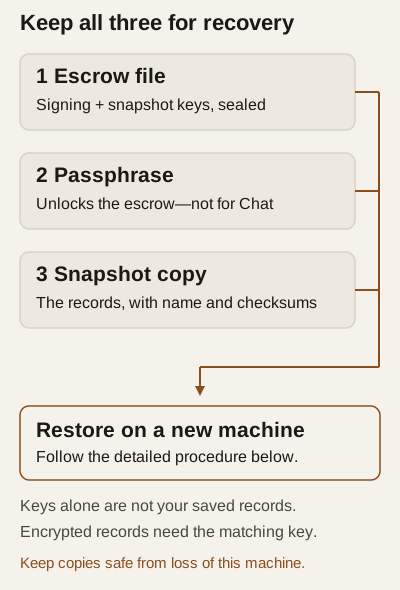
Use the local dashboard or TLS for passphrase entry; the host gates secret actions on loopback or TLS. Never paste recovery secrets into chat, issues, screenshots or diagnostic bundles.
Sources: Private-connection predicate; Secret-action gate
After checking escrow, confirm the dashboard says snapshots are encrypted, take a new snapshot, and prove that retained snapshot. Keep its original filename or complete folder with its checksum list when copying it. Do not treat an older plaintext snapshot as encrypted.
Obtain and check the off-machine copy
Before copying, confirm whether this snapshot is encrypted. Plaintext folders expose conversations and records; use confidential storage and transport. Decrypting for checks also creates plaintext scratch files.
Locate the retained artifact
- As the human administering this installation, locate
backupsbeside its active configured database, not an assumed shared Downloads folder. Match the retained name, date and record to Backups & Keys. The name isledger-<UTC timestamp>-seq<N>, optionally-ondemand; encryption adds.tar.age. Copy that whole encrypted file, or the complete original-named plaintext folder, includingSHA256SUMS, receipt, ledger segments and witness subfolders. Preserve the name and relative paths; do not copy onlyledger.jsonl, rename members or select a.snapshot-…tmpworking set. Copy, do not move or edit the local recovery point.
Sources: Snapshot folder location; Names, members and atomic publication 2. Use your operating system's file-copy facilities to independent storage you control. This release exposes no snapshot download or export control in Backups & Keys (the escrow download is different). A remote dashboard does not give its browser access to the host's backup directory: ask the installation's administrator to supply the exact retained artifact over a confidential transfer. If you cannot locate or access it, off-machine custody is not established; do not substitute the escrow file.
Sources: Dashboard controls
If the retained artifact cannot be located or copied completely, stop: off-machine custody is not established.
Check an encrypted copy
Prerequisites: check the destination copy, not live data. The human must already have the snapshot key. Opening or restoring escrow is a separate key-writing action, not part of this non-restoring check. Choose a new, nonexistent scratch output directory, and keep the unpacked plaintext protected.
- Use
aii snapshot open -in "<copied-file>" -out "<new-scratch-directory>" -key "<snapshot-key-path>". - Expect decryption, unpacking and checks against the internal
SHA256SUMS. On any reported failure, stop; do not treat the destination copy as checked. - After that check succeeds, run
aii verify -ledger "<unpacked-folder>/ledger.jsonl". On a verification failure or uncertain outcome, stop and preserve the reported result.
Check a plaintext copy
Prerequisites: work from the complete destination folder, not live data. It contains private conversations and records; protect its storage and transport.
- From the copied folder, use a SHA-256 checker against every entry in
SHA256SUMS(macOS:shasum -a 256 -c SHA256SUMS). - Expect every listed checksum to match. On any missing file or mismatch, stop; do not treat this copy as checked.
- After checksums match, run
aii verify -ledger "<copied-folder>/ledger.jsonl". On a verification failure or uncertain outcome, stop and preserve the reported result.
What these checks establish
These are proposed human checks, not commands run for this draft. They check checksums and signed record integrity, not a full database restore, witness rollback acceptance or model behavior.
Sources: Open and check semantics; Checksum format; Offline ledger check
Only a separately held, checked copy plus usable recovery keys addresses machine loss; Prove it restores on the original host alone does not establish that custody.
Restore is a consequential transition
On an existing identity, Restore… displays a plan: target record, later records and conversations being set aside, and witness implications. Read it before typing the displayed confirmation and selecting Restore and restart. The next start proves the source, journals the operation, moves the live data aside and installs the selected state. Put this back… offers retained set-aside data; it is another restore, not a merge. Preserve these folders while investigating.
Sources: Restore plan and warnings
Witness evidence and rollback warnings
A witness is a separate service retaining signed evidence of how far the record reached. An anchor submits a signed record number and hash; the witness's attestation is its signed receipt, not approval that the record's statements are true. Restoring behind that evidence can be refused as rollback.
SAFE is protective operation, not saved conversation
SAFE, also called safe mode, is protective operation with record and database writes frozen and only transient conversation and read-only diagnostics; visible chat does not mean it is saved.
Before confirming a restore
A pre-first-anchor snapshot has a recognition exception; neither case erases the witness's independent history. Before confirming, you — this identity's human operator — should compare the restore plan with the witness warning and seek the witness service administrator's help if unfamiliar. Preserve evidence; do not disable the witness merely to silence the warning. Recovery requires addressing the reported cause and a restart that passes checks, not a chat instruction. SAFE restrictions; Anchor request and receipt. See glossary.
If restoration is interrupted
Failures have phases. Before journalling, a rejected source or request is withdrawn without replacing live data. After journalling, an interruption may leave moves partly completed; the journal stays for the next start to continue. An unreadable journal prevents opening the record. Do not delete journals or repeatedly improvise file moves.
Sources: Restore startup phases
Restore onto a new machine
On a machine that has never held this identity, use the setup Restore an identity route, not Birth. It asks for escrow and passphrase, the original-named encrypted snapshot file or complete plaintext folder, plus separately configured provider and model access. Opening escrow already writes keys. A snapshot may be rejected with keys still present; restoration may finish even if subsequent startup fails. Stop at the exact reported phase rather than assuming an error means nothing changed.
Sources: New-machine route; New-machine failure boundaries
See command boundaries and updates and diagnostics. No recovery replay or disaster-recovery guarantee is claimed.